Laptop Keyboard Repair
When laptop keys stop responding, repeat characters, stick, or type the wrong letters, everyday work can become frustrating quickly. A keyboard may fail because of worn keys, liquid exposure, debris, a damaged ribbon cable, an internal connection problem, or a fault elsewhere in the laptop.
Steve’s Computers provides professional laptop keyboard repair in San Antonio for broken keys, missing keycaps, unresponsive keyboards, sticky keys, repeating input, and complete keyboard failure. Serving San Antonio since 2008, we diagnose the cause first so you know whether the keyboard needs repair, replacement, or attention to another component.
Starting At:
$150
Short on cash? Call and ask us for our affordable payment plan.
Laptop keyboard repair currently starts at $150. Final cost depends on the laptop model, keyboard design, part availability, backlighting, and whether the keyboard is part of a larger top-case or palm-rest assembly. We inspect the computer and explain the repair options before approved work begins.
Laptop Keyboard Repair and Replacement
Laptop keyboards are built differently depending on the model. Some can be replaced as individual assemblies, while others are integrated into the palm rest or top case. Backlit keyboards may also use additional connections that must match the specific laptop.
We repair and diagnose problems such as:
- Keys that do not respond
- Sticky or difficult-to-press keys
- Repeating keystrokes
- Missing or broken keycaps
- Entire rows of keys that stop working
- Incorrect characters or symbols
- Backlight problems
- Complete built-in keyboard failure
3,327+ Repairs Completed
Full 1-Year Warranty
3-5 Day Turnaround
Guaranteed Repair
Signs Your Laptop Keyboard Needs Repair
Keyboard problems do not always appear all at once. One key may stop responding before several others begin failing, or a keyboard may suddenly stop working after a spill, drop, or previous repair.
Common symptoms include letters that require repeated presses, keys that type twice, a spacebar or Enter key that works intermittently, or a section of the keyboard that no longer responds. You may also notice random characters or function keys behaving differently than expected.
These symptoms do not automatically mean the keyboard itself has failed. Software settings, keyboard layout changes, internal connections, and other hardware can create similar behavior.
Why Laptop Keyboards Stop Working
Normal wear can affect frequently used keys, while dust or debris can interfere with key movement. Physical damage can affect the key mechanism, keyboard frame, or internal connection. A drop may also shift a cable or connector even when the keyboard looks normal from the outside.
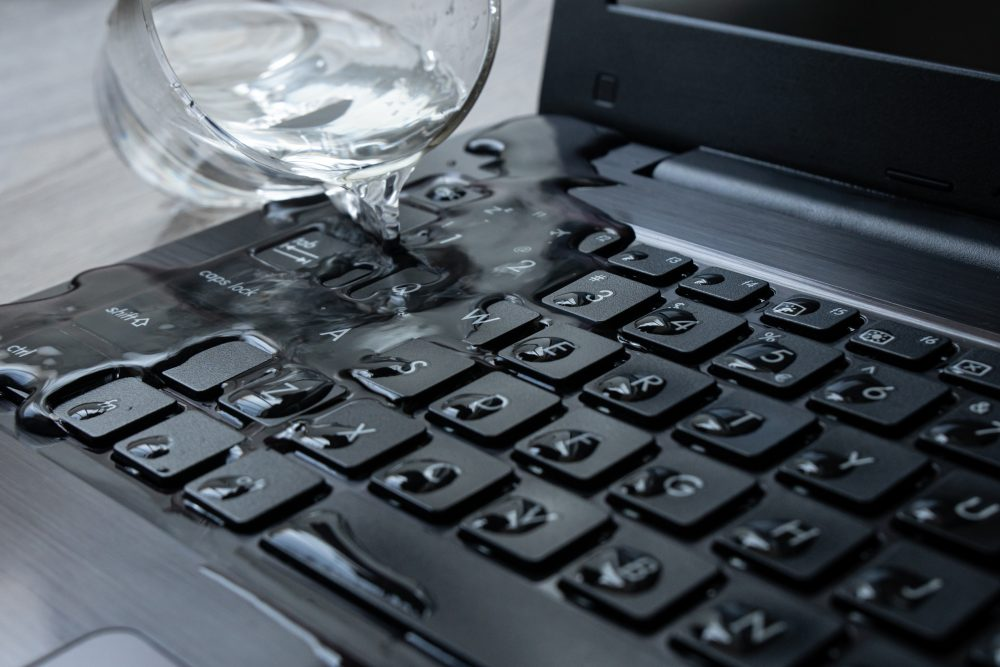
Liquid exposure is another major cause. A spill can damage keyboard contacts or travel underneath the keyboard toward the trackpad, motherboard, and other components.
Software can also affect keyboard behavior. Incorrect keyboard-language settings, accessibility options, drivers, or operating-system problems may cause input issues that resemble hardware failure.
Our Diagnostic Process for Keyboard Problems
Steve’s Computers uses a detailed diagnostic process to find the root cause before recommending a repair.
We check whether the issue affects one key, several keys, a full row, or the entire built-in keyboard. When useful, we may compare the laptop keyboard with an external keyboard. If an external keyboard works normally while the built-in keyboard does not, that can help narrow the problem.
We also consider the keyboard ribbon cable and connector when symptoms point toward an internal connection issue. If the keyboard stopped working immediately after the laptop was opened for another repair or upgrade, checking that connection can be especially important.
Once we identify the likely failure, we explain what we found and what repair makes sense. We only move forward with work you approve.
Broken, Missing, and Stuck Laptop Keys
A damaged keycap does not always require replacement of the entire keyboard.
Many laptop keys use small clips and a scissor-style mechanism beneath the keycap. If the keycap has come loose and the mechanism and mounting points are intact, the problem may be limited to that key. If the clips or mounting structure are broken, replacing only the visible keycap may not provide a dependable repair.
Sticky keys can also have different causes. Debris or residue may interfere with movement, while internal wear or liquid damage can produce similar symptoms. We inspect the affected area before deciding whether a localized repair or full keyboard replacement is more appropriate.
Keyboard Ribbon Cable and Connection Problems
The built-in keyboard commonly communicates with the motherboard through a flat ribbon cable and internal connector.
If that connection becomes loose, damaged, or improperly seated, the result can be partial or complete keyboard failure. Connection problems are particularly worth considering when trouble starts after internal service or physical impact.
Not every laptop uses the same cable arrangement, so the repair depends on the exact design.
Laptop Keyboard Replacement
When the keyboard has widespread electrical damage, severe wear, liquid damage, or multiple failed keys, replacement may be the practical option.
Replacement keyboards must match the laptop model, layout, mounting method, connector, and backlight configuration. Some modern laptops integrate the keyboard into a larger top-case or palm-rest assembly, so the repair may involve more than replacing a standalone keyboard.
We identify the correct configuration before recommending replacement.
Liquid Damage and Keyboard Failure
If your keyboard stopped working after a spill, the problem may extend beyond the keys.
Liquid can pass through the keyboard and reach internal components underneath it. Avoid repeatedly powering the laptop on to test whether the keyboard has recovered. Tell us about the spill when you bring the computer in so related liquid damage can be considered during diagnosis.
How Long Does Laptop Keyboard Repair Take?
Steve’s Computers currently lists a typical 3–5 day turnaround for laptop keyboard repair. Timing can vary depending on the model, part availability, keyboard design, and whether additional damage is discovered.
Customers who need faster service can ask about available expedited options.
Is Laptop Keyboard Repair Worth It?
A failed keyboard alone does not usually mean the laptop needs to be replaced.
If the computer still performs well and the problem is limited to the keyboard or its connection, repairing or replacing it can restore normal use. The decision depends on the laptop’s age, condition, keyboard design, cost of the required assembly, and whether other major problems are present.
We explain what is causing the problem and what the repair requires so you can make an informed decision.
Why Choose Steve’s Computers?
Steve’s Computers has served San Antonio since 2008. Our technicians diagnose keyboard problems as part of a broader laptop repair service, allowing us to check whether the issue involves the keyboard, software, internal connection, liquid damage, or another component.
We focus on finding the actual problem, explaining your options clearly, and performing only the work you approve. Customers receive updates during the repair process, and qualifying repairs are backed by our 1-year warranty.
Trusted For 15+ Years
With 15+ years of experience, we're a team of technicians dedicated to bringing you the best computer repair service you'll ever find.
Fast Turnaround Time
Don't wait WEEKS or MONTHS to get your computer repaired. Get it back in only a few days or less.
Regular Updates & More
You come first. We call you with regular updates every step of the repair process. You'll always know what's going on at all times.
Affordable Price Guarantee
We only fix what you need fixed and what you approve. Nothing more. Nothing less.
PLUS → We offer affordable payment plans for any budget.
Proven Diagnostic Process
Unlike other shops, we get down to the root cause first before we repair your computer. Your device will be fixed with 100% certainty using our proven 20-step diagnostic process.
Full 1-Year Warranty
Your repair comes with our hassle-free 1-year warranty baked-into your repair.
If the repair does not last within a year, then we'll fix it free of charge.
⭐⭐⭐⭐⭐
⭐⭐⭐⭐⭐
⭐⭐⭐⭐⭐
Get Laptop Keyboard Repair in San Antonio
If your laptop has broken keys, sticky buttons, repeating characters, missing keycaps, incorrect input, or a built-in keyboard that no longer works, bring it to Steve’s Computers for professional laptop keyboard repair in San Antonio.
Walk-ins are welcome, or call Steve’s Computers at (210) 241-2054 to speak with a local technician about your laptop keyboard repair or replacement.
EST 2008
Steve's Computer Repair is San Antonio’s premier repair center, with a track record of fixing over 3,237 devices. We specialize in top-notch repairs for leading brands like Dell, HP, and Apple. Our services include in-store and on-site options.
Proven Diagnostic Process
Get a diagnostic assessment for your device to accurately pinpoint needed repairs and receive a personalized quote. We prioritize efficiency and customer satisfaction, ensuring we won't keep your device for weeks just for diagnostics.
Unmatched Quality.
Rest assured, we adhere to manufacturing repair standards for every device model when repairing all computers. Whether it's laptop keyboard repair or something else, you can rely on our expertise to deliver quality results.